
TL;DR:
Regional managers at NDIS providers often carry more responsibility than their software lets them see. This guide explains what regional oversight needs from a platform.
It also shows how Vertex360’s Regional Managers and Team Leads feature gives you real-time control across distributed teams, without full admin access.
You manage 12 support workers and 40 participants across three service areas. On Monday morning, you need to know which weekend shifts went unfilled.
So you call two team leads, scan your inbox and wait for Thursday’s report. Someone else compiles that report, and it is out of date before you open it.
Many regional managers still work this way in 2026. The software on their screen has changed, but the workflow looks the same as it did a decade ago.
The cost is real. A missed shift, a lapsed worker screening check or a late incident report can quickly become a participant safety issue or a compliance breach.
NDIS regional manager software closes this gap. It gives you a live view of your region, so you stop chasing people for updates and start acting on facts.
What Regional Management Oversight Requires from Software
NDIS regional manager software gives a regional manager a live, region-specific view of team activity, worker compliance, incidents and participant status. It does this without granting full administrator access to the whole organisation.
Effective multi-team NDIS management software must deliver five things:
- Real-time team activity view: Who is rostered, who has started a shift and which shifts remain open.
- Worker compliance status across the region: NDIS Worker Screening, first aid, police checks and training records in one place.
- Incident alert and escalation visibility: New incidents appear as soon as workers lodge them.
- Participant status at a glance: Key participant details without opening every individual record.
- Regional reporting on demand: Your region’s numbers now, not after a manual compilation.
If a platform misses any of these, the regional manager falls back on phone calls, emails and spreadsheets. That is where oversight breaks down.
The Visibility Gap in Typical NDIS Provider Software
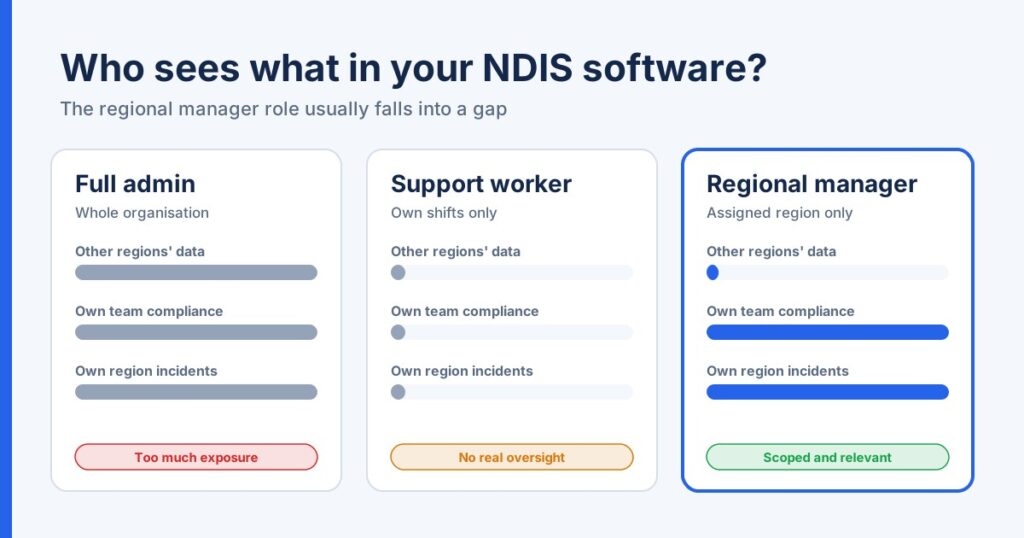
Most NDIS platforms offer two access levels. Administrators see everything, and support workers see only their own shifts and participants.
The regional manager sits between these two roles. Most software has no functional layer built for that position.
Providers usually fill the gap in one of two ways. Both create problems.
Option 1: Give the regional manager admin access.
- They see participant and worker data from regions they do not manage.
- This conflicts with need-to-know privacy principles that NDIS providers must follow.
- They sift through organisation-wide dashboards to find their own numbers.
Option 2: Give the regional manager worker-level access.
- They cannot see team compliance, incidents or rostering gaps.
- They rely on head office to send reports.
- They react to problems instead of preventing them.
| Access level | What the regional manager sees | Main risk |
| Full admin | The entire organisation | Privacy exposure and information overload |
| Support worker | Their own shifts only | No real oversight |
| Regional manager (Vertex360) | Their assigned region and sub-regions | Scoped, secure and relevant |
Timing matters too. The NDIS Quality and Safeguards Commission requires the most serious reportable incidents to be notified within 24 hours.
A regional manager who learns about an incident from a weekly summary has already lost critical response time. Real-time visibility is a compliance requirement, not a luxury.
How Vertex360’s Regional Managers and Team Leads Feature Works
Vertex360 built a dedicated access layer for regional oversight. You can explore the full feature on the Regional Managers and Team Leads page.
The setup is simple. Administrators create regions and sub-regions, allocate participants and workers to them, then assign a manager to each area.
The assigned manager sees the participants and workers in their region. Data from other regions stays out of view, which reduces the risk of data exposure.
Regional View of Team Activity
Your dashboard shows activity for your region only. You see your workers, your participants and your shifts, without filtering through the rest of the organisation.
Vertex360’s rostering features feed this view. The Manager Mobile App lets you check your region between site visits.
Worker Compliance Dashboard at the Team Level
Vertex360 stores worker checks and training records through its Human Resource Management module. Regional managers see this compliance data for their own team.
You can spot an expiring check before it becomes a rostering problem. Audit preparation also becomes faster, because your team’s records sit in one place.
Incident Notification with Regional Escalation
Support workers lodge incidents through the Vertex360 Worker’s App. Through Incident Management, those incidents become visible to the manager responsible for that region.
You review the details, take immediate action and escalate to your quality or compliance team. This shortens the gap between the event and the response.
Reporting Without Admin-Level Data Access
Vertex360’s Roles and Permissions system controls exactly what each user can view or edit. Permissions are granular, so a manager can view records without editing them.
Administrators and managers work in the Primary Portal, while support workers use the Frontline Portal. Two-factor authentication and AWS servers hosted in Australia protect the data behind both portals.
The result is simple. Regional managers get the operational picture they need, without access to data they do not need.
Providers notice the difference quickly. Judy Beeken, General Manager and Director at ANOTHEN Community Care, says Vertex360 “transformed our community care business.”
Regional Zoning and Team Oversight Together
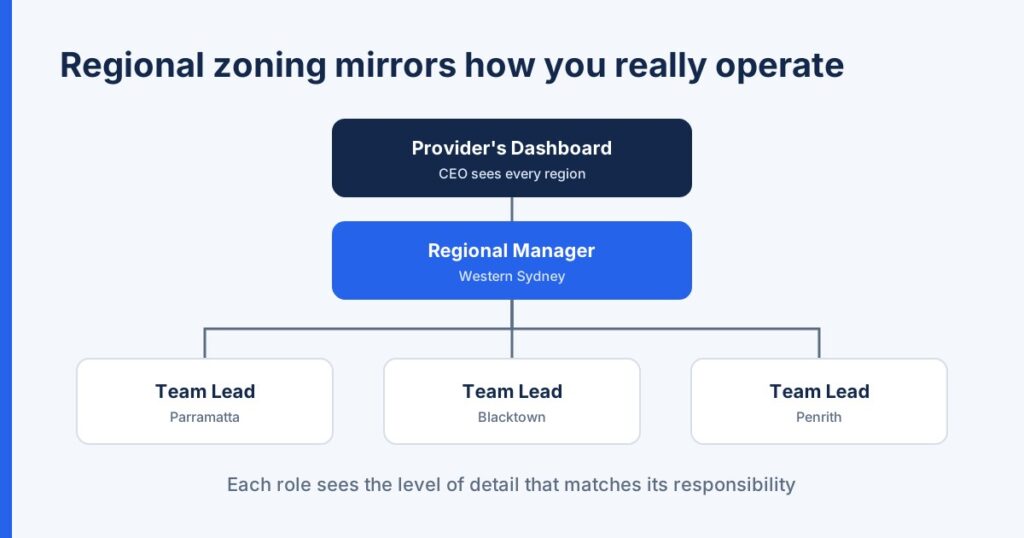
Regional zoning gives your software the same structure as your organisation. Each region and sub-region in Vertex360 mirrors a real service area.
Consider a provider in Western Sydney. The Western Sydney region could hold three sub-regions: Parramatta, Blacktown and Penrith.
A team lead oversees each sub-region. The regional manager oversees all three, and the CEO sees the full organisation through the Provider’s Dashboard.
This layered structure works well for multi-location providers in Australia. Each person sees the level of detail that matches their role.
Shift Coverage and Worker Availability by Zone
Zoning also makes rostering clearer. When workers and participants belong to a zone, open shifts and available staff are easier to match within that zone.
Picture 3pm on a Friday. A Penrith support worker calls in sick for an evening shift.
The Penrith team lead checks rostering for available workers in that sub-region. The regional manager sees the gap and the fix without making a single phone call.
Why Zoning Strengthens Oversight
- Clear accountability: Every participant and worker belongs to a defined area and manager.
- Stronger privacy: Managers access only their assigned regions.
- Faster decisions: Team leads act locally without waiting for head office.
- Easier growth: Adding a new service area means adding a new region, not rebuilding your processes.
A Checklist for Choosing NDIS Regional Management Tools
Use this checklist when you compare NDIS software with regional manager and team lead access in 2026:
- Can you create regions and sub-regions that match your service areas?
- Can you assign managers to specific regions only?
- Do regional managers see compliance status for their own team?
- Do incidents reach the responsible manager quickly?
- Are permissions granular enough to separate viewing from editing?
- Can managers check their region from a mobile app?
- Is data hosted in Australia with two-factor authentication?
Vertex360 answers yes to each of these. You can test every point yourself during a free trial.
Take Back Control of Your Region
Regional managers should not run their region through phone calls and weekly reports. You need live visibility of your teams, your compliance status and your incidents.
Vertex360’s Regional Managers and Team Leads feature gives you that visibility, scoped to your region and protected by role-based access. Your teams stay accountable, and your participants stay safer.
See Vertex360’s Regional Management Features in Action; Book a Demo
Frequently Asked Questions
What access level does a regional manager have in Vertex360?
A regional manager sees the participants and workers allocated to their assigned region and sub-regions. Administrators control the exact permissions through Vertex360’s Roles and Permissions settings.
How does regional reporting differ from organisational reporting?
Regional reporting covers only the manager’s assigned region. Organisational reporting, available through the Provider’s Dashboard, covers every region and is usually reserved for executives and administrators.
Can regional managers approve timesheets in Vertex360?
Timesheet approval depends on the permissions your administrator assigns. Vertex360’s granular permissions let you grant or restrict approval rights for each role, so providers decide who signs off on hours.
How does regional zoning work in Vertex360?
Administrators create regions and sub-regions that match their service areas. They then allocate participants, workers and managers to each zone, so every user sees the information relevant to their area.
Is participant data secure when regional managers use Vertex360?
Yes. Regional managers can only access participants and workers in their assigned regions, which limits data exposure. Vertex360 also protects every account with two-factor authentication and stores data on AWS servers hosted in Australia.