

Support workers spend most of their time in the field, not behind a desk.
That single fact should drive every decision you make about NDIS software mobile apps. Yet many providers still force their workers to log details hours later, create duplicate documentation, or struggle with systems that fail the moment they lose internet connection.
Are you wondering how top NDIS providers keep their field operations running smoothly while maintaining compliance? The answer lies in choosing the right mobile application with the right features.
By the end of this guide, you’ll know exactly what mobile functionality your support workers need and how to implement it successfully.
Why NDIS Mobile Applications Matter for Field Operations
Think about your typical support worker’s day. They travel between participants’ homes, provide care in community settings, and document incidents as they happen. Desktop-only software simply doesn’t match this reality. Understanding the right NDIS software features for small providers becomes crucial for operational success.
Mobile NDIS applications solve three critical problems:
Real-time data capture eliminates documentation delays. Support workers can record shift notes, log incidents, and update participant information immediately, ensuring accuracy and compliance.
Field access reduces administrative burden. Workers access schedules, participant details, and care plans directly from their phones, removing the need for printed materials or memory-based work. This connects directly with efficient NDIS rostering systems that work seamlessly between office and field.
Instant communication improves safety outcomes. Workers can report emergencies, request backup support, and communicate with supervisors without delay.
Mateja from a NDIS provider explains the impact: “Vertex 360 is a clear and simple app that makes support work so much easier. Its user-friendly, and everything is well-organised. The mile calculator feature is a gamechanger, it’s super convenient for tracking travel distances accurately.”
Essential Mobile App Features for NDIS Field Operations
Not all mobile features are created equal. Here’s what actually matters for field-based support workers:

Shift Management and Scheduling
Support workers need instant access to their schedules and the ability to manage unexpected changes. Essential scheduling features include:
- Real-time schedule viewing: Workers see their current and upcoming shifts with participant details and locations
- Clock in/out functionality: Time tracking that works whether workers are early, late, or handling shift variations
- Unscheduled shift support: Ability to log emergency or last-minute shifts without pre-planning
- Schedule notifications: Push alerts for shift reminders, changes, or cancellations that integrate with comprehensive participant management tools
Mayleen, a support worker using Vertex360, shares: “I love using Vertex 360 because it’s so easy to use and I love how I can see all my schedule and plan around it. It also has the participant’s details that you will need to know so you can properly support them.”
Documentation and Notes
Field documentation must be quick, accurate, and compliant. Key features include:
- AI-assisted shift notes: Smart templates that guide workers through required documentation
- Voice-to-text capability: Hands-free note creation while maintaining participant privacy
- Photo and file attachments: Visual documentation of incidents, activities, or participant progress
- Compliance checking: Automatic validation to ensure all required fields are completed
Incident Reporting
When emergencies happen, reporting must be immediate and thorough:
- One-tap incident creation: Quick access to incident forms with location and time pre-populated
- Photo documentation: Visual evidence capture with automatic location and timestamp data
- Supervisor notifications: Instant alerts to management for serious incidents
- Follow-up tracking: Status updates and required actions visible to field staff, supported by comprehensive risk management systems
Travel and Mileage Tracking
Accurate travel documentation is essential for billing and worker compensation:
- Automatic distance calculation: GPS-based mileage tracking between locations
- Route optimisation suggestions: Efficient travel planning for multiple participants
- Travel time logging: Separate tracking for billable travel versus personal time
- Expense integration: Direct connection to payroll and reimbursement systems that work with effortless NDIS invoicing processes
Ritu, who has used Vertex360 for two years, explains: “While signing in this app, this app itself calculate the kms covered during the shift, which we don’t need to count at end of the shift.”
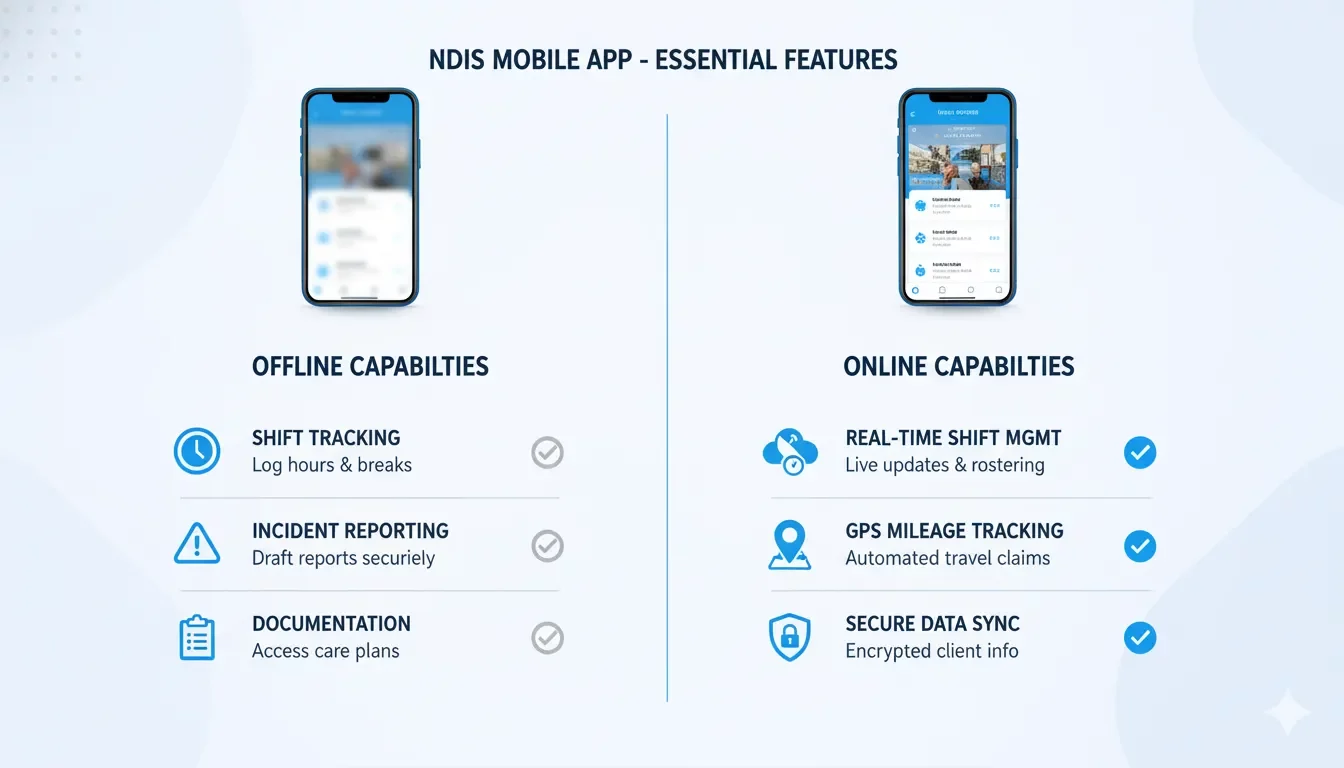
Offline Capability Requirements for NDIS Apps
Internet connectivity is unpredictable in field settings. Your mobile app must work regardless of signal strength.
Critical Offline Functions
These features must work without internet connection:
- Schedule viewing: Access to current and next-day shifts
- Participant information: Care plans, emergency contacts, and important notes
- Time tracking: Clock in/out functionality that syncs when connection returns
- Basic documentation: Shift notes and incident reports stored locally
Data Synchronisation Strategy
When connectivity returns, data must sync seamlessly:
Automatic sync prioritisation. Critical data like incidents and emergency information sync first, followed by routine documentation.
Conflict resolution. Smart handling of data conflicts when multiple updates occur to the same record.
Background processing. Sync happens without interrupting worker activities or requiring manual intervention.
Storage Management
Offline capability requires careful data management:
- Selective data download: Only relevant participant and schedule information stored locally
- Regular cache updates: Automatic refresh of offline data when connected
- Storage optimisation: Efficient use of device storage without compromising functionality
Mobile Security Considerations for NDIS Apps
Mobile devices present unique security challenges that require specific protections.
Device Security Measures
Protection starts with device-level security:
Mandatory device locking. PIN, password, or biometric requirements that activate after brief inactivity periods.
App-specific security. Additional authentication required to access the NDIS application, separate from device unlock.
Remote wipe capability. Ability to remove all NDIS data from lost or stolen devices without affecting personal information.
Data Encryption Standards
All participant information requires encryption protection:
- Data at rest: All locally stored information encrypted using industry-standard methods
- Data in transit: Secure transmission protocols for all communication with servers
- End-to-end encryption: Protection that ensures even system administrators cannot access participant data
Access Controls
User permissions must reflect role-based access:
- Participant-specific access: Workers only see information for their assigned participants
- Feature limitations: Restricted access to administrative functions or sensitive data
- Session management: Automatic logout after periods of inactivity
Audit Trail Requirements
Complete tracking of all mobile app activity supports achieving NDIS compliance standards:
- User activity logging: Record of all data access, modifications, and system interactions
- Location tracking: GPS coordinates for shift activities and documentation
- Device identification: Tracking which device accessed what information when
User Experience Considerations for Support Workers
The best security and features mean nothing if workers won’t use the app. User experience drives adoption.
Interface Design Principles
Mobile interfaces must accommodate field conditions:
Large touch targets. Buttons and links sized for use with gloves or in vehicles.
High contrast display. Clear visibility in bright sunlight or low-light conditions.
Minimal text input. Dropdown selections, checkboxes, and voice input reduce typing requirements.
Workflow Optimisation
Common tasks should require minimal steps:
- One-tap clock in: Single action to start shifts with automatic location detection
- Quick documentation: Pre-filled templates that require only specific details
- Smart defaults: App remembers common choices and locations
Training and Support Needs
Field workers need different support than office staff, especially as organisations transform their HR approaches for modern NDIS operations:
- Visual training materials: Screenshots and videos accessible from within the app
- Contextual help: Assistance available at each step of common processes
- Peer support networks: Easy way to get help from experienced colleagues
Daniel, a support worker, emphasises simplicity: “Vertex360 is an amazing app! Super easy to use, with great features that make my life easier. The interface is smooth, and everything works perfectly.”
Vertex360 Mobile Solutions for Field Operations
Vertex360’s worker mobile app addresses the real needs of support workers with practical, field-tested features.
Core Mobile Features
Vertex360’s approach focuses on essential functionality:
Streamlined shift management. Workers access their schedules, clock in and out, and manage unscheduled shifts from a single screen as part of 10 ways Vertex360 revolutionises NDIS workflows.
Intelligent travel tracking. Automatic mileage calculation and travel time logging eliminate manual calculations and reduce payroll disputes.
AI-powered documentation. Smart shift note templates guide workers through required documentation while maintaining compliance standards.
Instant incident reporting. One-tap access to incident forms with automatic supervisor notifications for serious events.
Offline Functionality
Vertex360 works reliably regardless of connectivity:
- Full offline capability: Core functions work without internet connection
- Smart synchronisation: Data syncs automatically when connection returns
- Conflict resolution: Intelligent handling of data conflicts
- Background processing: Sync doesn’t interrupt worker activities
Security Implementation
Enterprise-grade security designed for mobile environments:
- Multi-factor authentication: Additional security layers beyond device locks
- Role-based access: Workers see only relevant participant information
- Encrypted storage: All local data protected with industry-standard encryption
- Audit compliance: Complete activity logs for regulatory requirements
Jan Christopher notes practical benefits: “This app is very useful on managing shifts. You’ll also be able to see records of what you input to review at a later time.”
Implementation Strategy for Mobile App Deployment
Successful mobile app deployment requires careful planning and gradual rollout.

Pre-Implementation Assessment
Before deployment, evaluate your current situation:
Device readiness survey. Assess what devices workers currently use and their comfort level with mobile apps.
Connectivity mapping. Identify areas with poor internet coverage where offline functionality is critical.
Workflow analysis. Document current field processes to ensure the mobile app improves rather than complicates work.
Pilot Program Structure
Start with a small group of experienced workers:
- Select tech-comfortable volunteers: Choose workers who are comfortable with technology and can provide useful feedback
- Limited scope testing: Focus on one or two key features initially
- Daily feedback collection: Regular check-ins to identify and resolve issues quickly
- Iterative improvements: Make adjustments based on real-world usage
Training Program Development
Field workers learn differently than office staff:
Hands-on demonstrations. Show workers how to use the app with real scenarios they encounter.
Peer training programs. Experienced workers train their colleagues, creating support networks.
Just-in-time resources. Quick reference guides accessible from within the app for when workers need help.
Support System Setup
Field workers need accessible support:
- Multiple contact methods: Phone, chat, and in-app support options
- Fast response times: Quick resolution of issues that could impact participant care
- Escalation procedures: Clear paths for urgent technical problems
Rollout Timeline
Gradual deployment reduces risk and improves adoption:
Week 1-2: Pilot group training and initial testing
Week 3-4: Pilot feedback integration and system adjustments
Week 5-8: Gradual expansion to additional worker groups, implementing strategies to avoid scheduling conflicts
Week 9-12: Full deployment with ongoing support monitoring
Common Implementation Challenges and Solutions
Every mobile app implementation faces predictable challenges. Here’s how to address them:
Worker Resistance to Technology
Challenge: Some workers prefer paper-based systems or feel overwhelmed by new technology.
Solution: Focus on how the app makes their job easier, not on the technology itself. Demonstrate time savings and reduced paperwork rather than technical features.
Inconsistent Internet Coverage
Challenge: Rural areas and some residential locations have poor mobile data coverage.
Solution: Prioritise offline functionality and ensure workers understand which features work without connection. Consider providing mobile data allowances for work purposes.
Device Compatibility Issues
Challenge: Workers use various personal devices with different operating systems and capabilities.
Solution: Choose software that works across platforms and provide minimum device requirements. Consider device subsidies for workers who need upgrades.
Data Security Concerns
Challenge: Workers worry about storing sensitive participant information on personal devices.
Solution: Clearly explain security measures and data protection. Emphasise that proper mobile security is often better than paper-based systems.
Measuring Success and ROI
Track specific metrics to demonstrate the value of your mobile app investment:
Operational Metrics
- Documentation completion rates: Percentage of shifts with complete notes and required information
- Time to incident reporting: Average time between incident occurrence and formal reporting
- Travel accuracy: Reduction in mileage disputes and travel time calculations
- Schedule adherence: On-time performance and attendance tracking
Financial Metrics
- Administrative time reduction: Hours saved on manual data entry and paperwork processing
- Billing accuracy improvement: Reduction in incorrect or disputed time and travel claims
- Compliance cost savings: Reduced audit preparation time and regulatory penalties, demonstrating key benefits of implementing NDIS software
Worker Satisfaction Indicators
- App usage rates: Daily active users and feature adoption percentages
- Worker feedback scores: Regular surveys about app usefulness and satisfaction
- Turnover reduction: Impact on worker retention and job satisfaction
Future Trends in NDIS Mobile Applications
Mobile technology continues evolving. Here’s what’s coming:
Artificial Intelligence Integration
AI will enhance mobile apps through:
- Predictive scheduling: AI suggests optimal routes and timing based on historical data
- Smart documentation: Automatic generation of shift notes from voice recordings
- Risk assessment: Early warning systems for participant safety concerns
Enhanced Offline Capabilities
Future apps will offer:
- Extended offline periods: Multiple days of functionality without connection
- Peer-to-peer sync: Data sharing between nearby devices without internet
- Smart data prioritisation: More intelligent decisions about what information to store locally
Wearable Device Integration
Smartwatches and fitness trackers will enable:
- Hands-free operation: Voice commands and gesture controls
- Health monitoring: Worker safety and wellness tracking
- Emergency alerts: Automatic distress signals and location tracking
Taking Action: Your Next Steps
You now understand what makes an effective NDIS mobile application and how to implement it successfully.

The difference between providers who thrive and those who struggle often comes down to choosing the right tools and implementing them properly. Mobile apps aren’t just convenient – they’re becoming essential for competitive NDIS service delivery. Discovering the best NDIS software for providers starts with understanding mobile functionality needs.
Start with assessment. Evaluate your current field operations and identify the biggest pain points your workers face.
Test before committing. Use pilot programs and free trials to ensure any solution fits your specific needs. Look for signs it’s time to upgrade your current NDIS systems.
Plan for success. Develop comprehensive training and support systems before full deployment.
Ready to see how Vertex360’s mobile app can transform your field operations? Book a free demo and discover why support workers call our app a “game-changer” for field-based NDIS work.
Your support workers deserve tools that make their jobs easier, not harder. The right mobile app can be the difference between frustrated workers and a thriving team.